
Mar 28, 2024
CIIP
DICOM
Education
Unraveling DICOM: Mastering Medical Imaging Commands
In the realm of medical imaging, the Digital Imaging and Communications in Medicine (DICOM) standard is a cornerstone, facilitating seamless data exchange across myriad systems.
Understanding the intricacies of DICOM's operational core, which includes both C-commands and N-commands, as well as the Command Set Parameter, is crucial for professionals in this field. This comprehensive guide aims to demystify these components, highlighting their interactions and practical applications.
The Duality of DICOM Commands: C-Commands and N-Commands
In the symphony of DICOM operations, not all instruments play the same role. Similarly, in DICOM, not all commands serve the same function. The differentiation between C-commands and N-commands highlights this diversity, catering to different types of objects and operations within the DICOM framework.
C-Commands (Composite Commands): These commands are tailored to composite objects, which are essentially packages of data that include both the information (such as an image) and its associated metadata (contextual details like patient ID, study date, etc.). Composite objects are like books in a library; each book (image) contains not just the story (the visual information) but also a cover with the author's name, title, and publication details (metadata).
Example: When using a C-STORE command, a hospital's imaging system is instructing the PACS (Picture Archiving and Communication System) to store an X-ray image. This X-ray image (the composite object) includes not just the visual data but also critical metadata such as the patient's information, the date of the study, and more.
N-Commands (Normalized Commands): On the other hand, these commands interact with normalized objects. Normalized objects represent more abstract concepts or processes within the DICOM network, such as the status storage of an image or the progress of an imaging study. These objects are akin to status updates or notifications in a digital workflow, providing dynamic information about ongoing processes.
Example: An N-CREATE command might be used to initiate a new imaging study within the system. Unlike a C-command that deals with storing or retrieving a static image, this N-command is about setting in motion a new process or workflow instance, akin to starting a new project in a project management tool, specifying its parameters and initial status.
Bridging the Gap Between Composite and Normalized Objects
Understanding the distinction between composite and normalized objects, and how C-commands and N-commands apply to each, is akin to understanding the roles of different sections within an orchestra. Just as strings and brass might play different parts in a symphony, C-commands and N-commands play specific roles in the management and execution of DICOM operations, ensuring that both static data and dynamic processes are handled efficiently within the medical imaging ecosystem.
This nuanced approach allows DICOM to cater to the complex needs of medical imaging workflows, ensuring that both the static images and the dynamic processes that produce and manage those images are seamlessly integrated and managed across diverse healthcare IT systems.
The Command Set Parameter: The Conductors' Baton
At the heart of DICOM's intricate dance between systems is the Command Set Parameter, acting as the orchestra's conductor, guiding each movement with precision. This set of attributes is crucial, dictating the specific actions to be taken by the DICOM service provider, ensuring flawless execution of operations. It is this conductor's baton that harmonizes the symphony of data exchange, from the Service Class User (SCU) to the Service Class Provider (SCP), with precision and grace.
Key Components of Harmony:
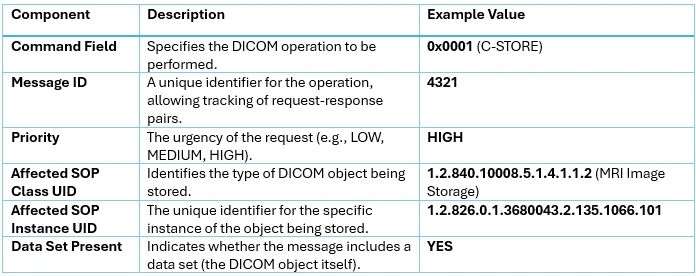
Command Field: This specifies the operation to be performed, such as storing or retrieving data. Think of it as the conductor's cue to the orchestra, signaling the type of piece to be played.
Message ID: Serving as a unique identifier, it ensures that each request and response match perfectly, like a musical score that guides each musician's timing and synchrony in the ensemble.
This orchestration enables a seamless interchange between SCU and SCP, ensuring that each command is executed with the intended effect, much like a conductor ensures that every note contributes to the overall harmony of the performance.
Practical Applications: DICOM Commands in Action
To illustrate the roles of C-Commands and N-Commands, along with the Command Set Parameter, let's consider their application in real-world DICOM operations.
C-Commands at Work:
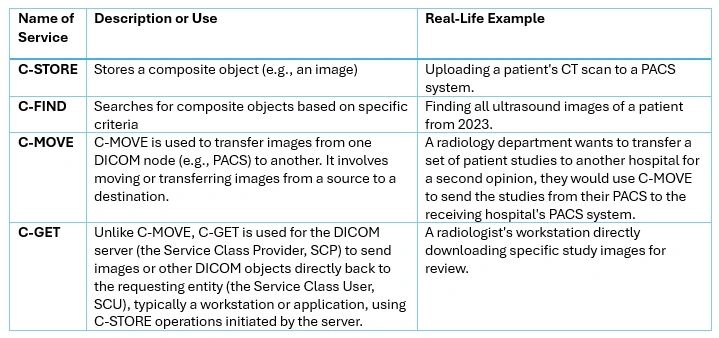
C-MOVE vs. C-GET: A Closer Look
C-MOVE: Imagine a relay race where a DICOM server (the SCP) passes the baton (a DICOM object) to another server (another SCP). The server receiving the C-MOVE request doesn't get the baton directly; it instructs where the baton should be sent, initiating a C-STORE operation to transfer it to the specified destination.
C-GET: Contrast this with a direct delivery service, where the DICOM server (SCP) directly sends (pushes) the requested DICOM objects back to the requester (the SCU) using C-STORE operations. The requester receives the package directly at their doorstep, without intermediaries.
N-Commands for Workflow Management:
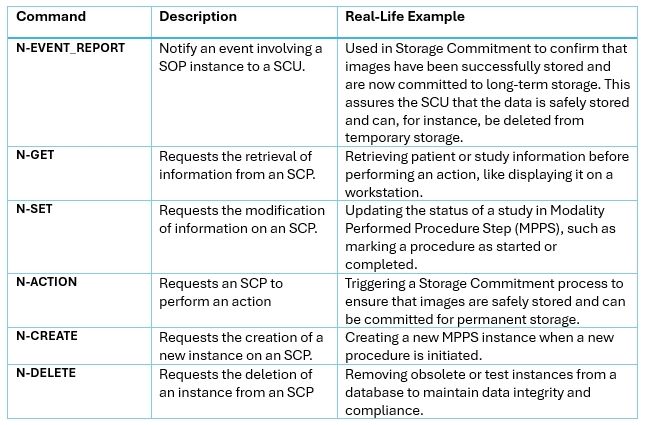
The Symphony of DICOM Operations:
Hypothetical Example: Understanding the C-STORE Command: A Detailed Breakdown
The DICOM C-STORE command is a cornerstone of medical imaging workflows, allowing for the transfer and storage of images and other medical documents within a Picture Archiving and Communication System (PACS). To illuminate the mechanics behind this crucial operation, let's delve into a hypothetical scenario involving an MRI scan being sent to a PACS server.
Imagine an MRI scanner (the Service Class User, or SCU) sending a DICOM message to a PACS server (the Service Class Provider, or SCP) to store a newly captured MRI image. While in real systems this exchange is encoded in a specific format, for the sake of clarity, we'll outline the message's command set parameters in a more accessible manner:
Command Field: 0x0001 (C-STORE) Message ID: 4321 Priority: HIGH Affected SOP Class UID: 1.2.840.10008.5.1.4.1.1.2 (MRI Image Storage) Affected SOP Instance UID: 1.2.826.0.1.3680043.2.135.1066.101 Data Set Present: YES
This DICOM message instructs the PACS server to store the MRI image, identified by specific UIDs (Unique Identifiers), with a high priority level.
Component Breakdown of the C-STORE Command Message
To further understand the elements of this command message, let's examine the critical components:
The Dialogue of DICOM Commands: Request and Response
Following a C-STORE request from an SCU, the SCP will generate a corresponding C-STORE response. This response will mirror certain values from the request, such as the Command Field and Message ID, providing a cohesive mechanism for confirming the successful storage of the requested image. This back-and-forth is akin to a conversation where the request is the question and the response is the answer, confirming the operation's outcome.
The interaction between SCU and SCP, especially in the context of a C-STORE command, exemplifies the sophisticated yet streamlined communication protocols that underpin the DICOM standard, ensuring efficient and reliable management of medical imaging data across healthcare systems.
Want to Keep Learning?
To deepen your understanding and further explore the intricacies of imaging informatics, consider diving into our course "IMG_101: Introduction to Imaging Informatics," designed to expand your knowledge of imaging informatics and prepare you for the CIIP exam. Visit our learning platform for more information.